Features
Everything in the Rin Chat desktop app
Rin Chat covers the whole loop: the character card and the library around it, the chat and its cast, adventure mode when a card asks for it, the prompt that reaches the model, and the encrypted store underneath.
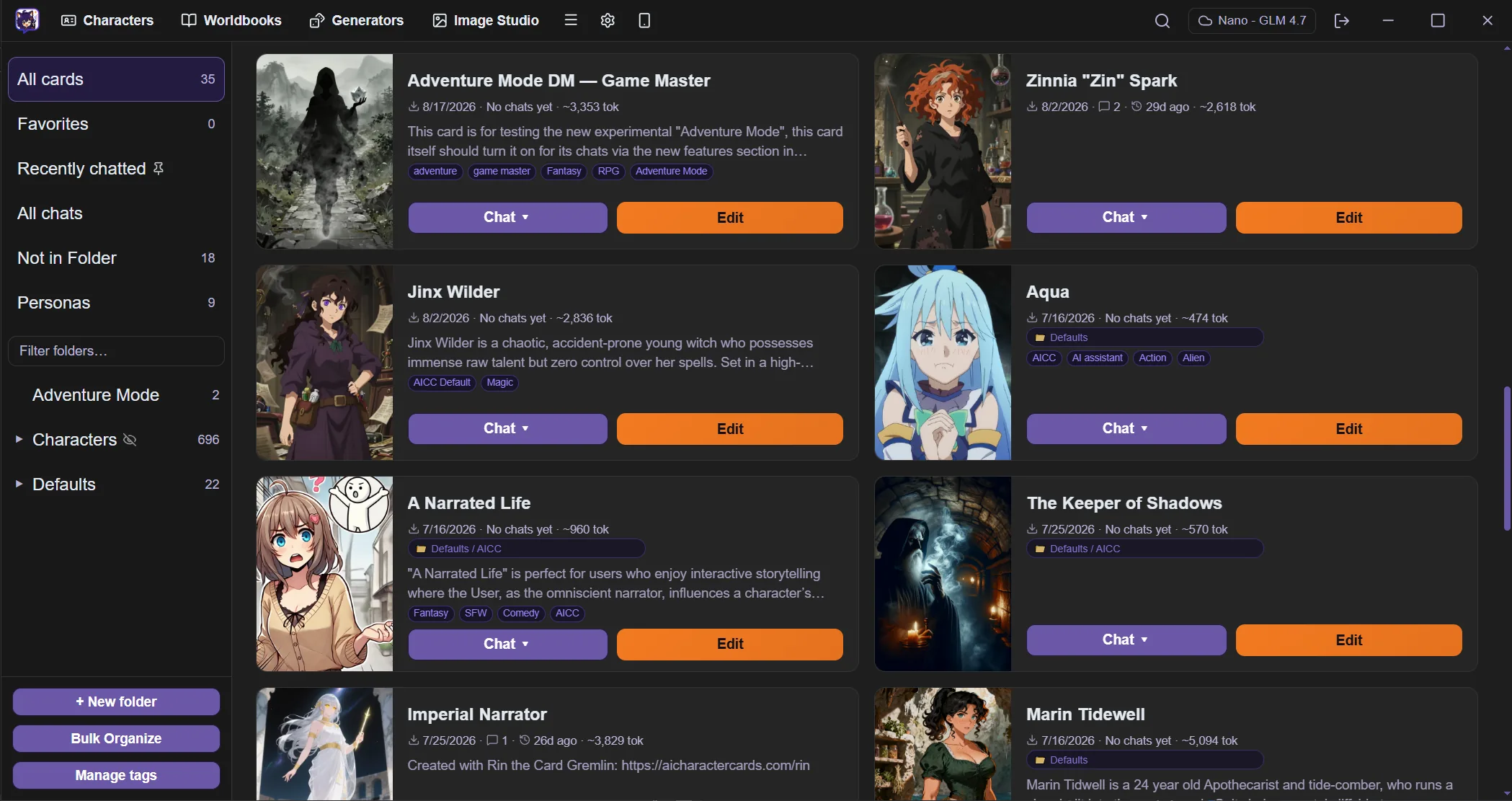
Character cards
Bring in the cards you already have, edit every field, and keep a large library in order.
Import existing cards
Rin Chat reads the V1, V2 and V3 character card formats, including cards embedded in a PNG image. Import one, or a whole folder at once.
A card format that does not trap you
Rin Chat has its own card format for the things older ones cannot express — but it never becomes a one-way door. Export back out as a standard character card any time, as JSON or as an embedded PNG, and other apps read it.
Forward and backward compatible
Fields a future version adds ride along untouched instead of being stripped, so a card made in a newer build still opens here. Exports carry a classic-format mirror and write both PNG character chunks, so older apps still read them.
Nothing is lost on the way in
An imported card keeps a verbatim copy of the original, so exporting it back to its own format returns everything that came in — including the parts Rin Chat has no field for.
Structured editor
Each part of a card gets its own field: description, appearance, personality, behavior rules, speech style, background, setting, greetings and example dialogue. Older cards migrate to that shape when they load.
Library
Folders, tags, favorites, and sorting by recently updated, recently chatted, newest or name. Search covers the text inside a card, and inside a character it also searches the messages of every chat with them.
Tag manager
Rename, merge, color and delete tags across the whole library, normalize their capitalization, and review suggested merges for near-duplicate spellings.
Version history
The editor keeps snapshots of a card as you leave it. Open the history and restore an earlier version.
Checks while you write
A live token estimate sits next to each long field, with advisory notes such as a missing first message, an oversized description or a lorebook entry with no keys.
Chat
A writing surface built for iteration, not a single take.
Several chats at once
Open as many conversations as you like and switch between them. A chat you leave stays exactly where it was and keeps running in the background, so a long reply finishes while you are somewhere else.
Streaming replies
Text arrives token by token, so you can read a reply as it is written.
Swipes and regenerate
Ask for another reply, or steer the retry with one-click dials for length, pace, tone and repetition. You can also write your own direction for the retry.
Edit, delete and branch
Change any message in place, remove it, or branch the chat from a message to explore a different direction while the original stays intact.
Continue and impersonate
Extend the last reply with more text, or have the model draft your own next line into the input box, where you read and edit it before it sends.
Response length and prefill
Cap the next reply at short, medium or long without touching your sampler settings, and start a reply with exact text you supply.
Quick replies
One-tap buttons above the composer send a message you saved, or drop it into the input for you to edit first. They support macros.
Export and import
Move a chat out as Markdown, plain text or JSONL, and bring it back in.
Casts and personas
Decide who is in the scene, including you.
Group chats
Put several characters in one chat. Turns rotate, and the chat resumes from the last speaker when you reopen it.
Per-member settings
Each member of a group can use its own provider, model and prompt preset.
The model picks the speaker
Ask who should speak next. The model reads who was addressed and what fits, and a plain rotation takes over when that is unclear.
Auto mode
Let the members answer each other for a set number of turns while you read.
Personas
A persona holds your display name, the name the model sees, your appearance, your personality and example lines of your dialogue.
Temporary personas
Write a persona that belongs to one chat only, then promote it to your saved list if you want to keep it.
World building
Background detail that reaches the model when it is relevant, and not before.
Lorebook editor
Full control of a card's entries: keys and regex keys, secondary keys and their logic, always-on entries, insertion position and order, depth and role, and a probability.
Standalone worldbooks
Keep a worldbook outside any single card, in its own editor. Turn one on for everything or attach it to a single chat. World info JSON imports and exports.
Lorebook tester
Paste sample text and see which entries would activate, and why each one matched, missed or was filtered out.
Macros
Insert dynamic values into a card, a lorebook entry or a prompt: variables, comparisons, conditionals, dice rolls, random picks, date and time. A settings panel resolves any macro against a sample scope so you can test it first.
Generators
Reusable weighted randomizers for NPC details, dice and outcome tables. Call one inline and the result freezes into the message, give it a chance to fire on its own each turn, or let the model call it.
Adventure mode
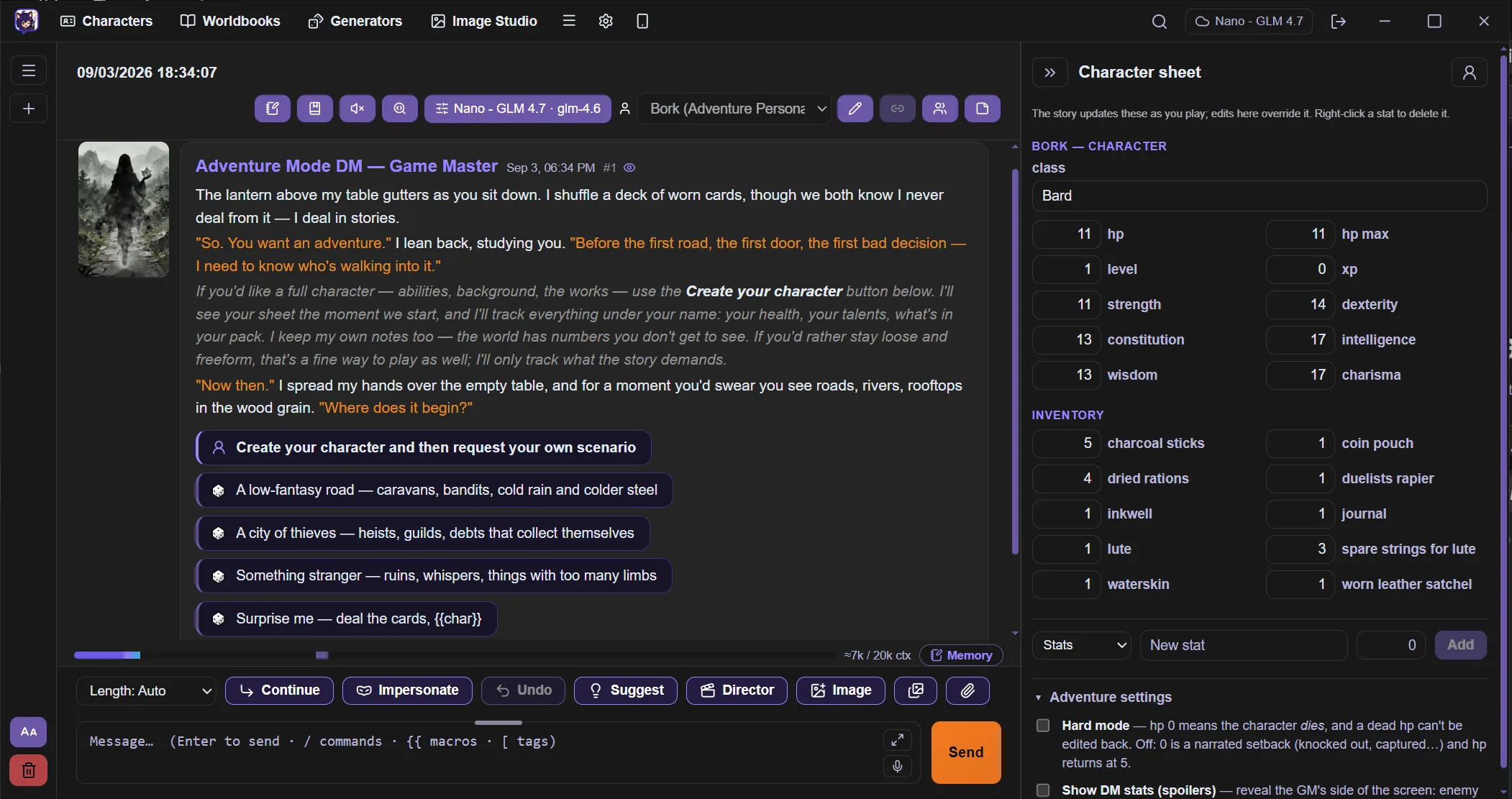
Light game mechanics inside an ordinary chat, for cards that ask for them. The model plays game master and the app is the referee — it rolls the dice and keeps the numbers honest.
The app referees, not the model
The model asks for a roll or a stat change; the app performs it. Dice are actually rolled and results are actually applied, so an outcome cannot be quietly narrated in the model's favour.
Choices and rolls as buttons
Offered actions become buttons under the reply. A roll shows the dice, the difficulty and what is at stake before you commit to it.
A character sheet that keeps itself
Abilities, level, XP, health, inventory and money update as you play, with ability scores folded into the rolls that use them.
Costs that are real
A choice can carry a price. Taking it spends the coin or the health there and then, and the receipt is on the record rather than left to the model to remember.
Rewind puts it back
Edit or delete your way back up the conversation and every stat change along the way is reversed with it. The sheet always matches the story you actually kept.
The world keeps its own numbers
Named characters, factions, clocks and quiet countdowns are tracked separately from your own sheet, and the game master's side can stay hidden until you choose to see it.
Per card, not a mode you switch on
A card declares that it wants adventure mode. Every other chat is untouched, with no extra buttons and nothing added to the prompt.
Prompting and memory
The controls that decide what the model receives, and what it still knows fifty messages later.
System prompt presets
Save system prompts and switch between them, along with the context template that assembles the character block.
Author's Note
Hold a standing instruction near the end of the prompt, where the model weighs it most. Set a default, override it per chat, and choose its depth and role.
Context budgeting
History is trimmed to the token budget you set. The system block and the newest message are always kept.
Summary and memory
Condense earlier turns into a running summary, on demand or automatically. Pin any message so its content is injected on every turn.
Scene tracker
A tracked note of the current scene — place, time, who is present, the mood — injected as its own block so those details stay consistent.
Regex scripts
Ordered find-and-replace passes over message text. Choose whether each one affects the prompt, the display or both, and try it on sample text first.
Models and providers
Bring your own endpoint, and control how it decodes.
Any OpenAI-compatible provider
Add as many providers as you need, each with its own endpoint, key and model. The key stays on your device.
Model picker
Type a model id directly, or search the list the provider reports and pick from it.
Sampler settings
Temperature, top-p, top-k, min-p, penalties, seed, stop sequences and a response token cap, plus advanced samplers including DRY, XTC, mirostat, typical-p and CFG.
Reasoning controls
For models with a reasoning step: the effort level, the request format the provider expects, and whether the reasoning is shown. The reasoning is never sent back to the model.
Fallback and retry
If the main model is overloaded before anything streams, Rin Chat retries once on a fallback model you named, and offers a model picker on the error itself.
AI helpers
Optional assists that run on the provider you already selected.
Suggested replies
Get candidate replies for yourself when you do not know what to write next.
Rewrite a section
Highlight part of any message, add an instruction, and have only that part rewritten with the rest of the chat as context.
Chat titles
Name a chat from its opening exchange, on request or automatically.
Story director
Give it a storyline. A planner turns it into an outline you edit, regenerate or reject, then a second pass writes the direction for each beat. Run it beat by beat with a review step, or let it play with a pause for reading.
Card tools
Summarize a card into a private note, rewrite a single field from an instruction, and restructure a flat imported card into the structured fields.
Editable prompts
The quick prompts behind the AI edit buttons and the director's own planner prompts are yours to change.
Card Forge
Guided character creation for when you have an idea but not a card. Talk it through with a guide, then turn the conversation into a finished card.
Brainstorm, then generate
Describe what you want and go back and forth until the character is right. When you are happy, Rin Chat reads the whole conversation and writes the card from it.
Guides with their own voice
Pick the collaborator you want to work with, or write your own. A guide changes how the conversation feels without changing what a finished card has to contain.
Edit by asking
Ask for a shorter description or a different speech style and the change is applied to the card itself, field by field, rather than buried in a wall of regenerated text.
It lands in your library
The result is an ordinary card. Open it in the editor, chat with it, or export it like any other — nothing about it is locked to the Forge.
Sessions are kept
Forge conversations are saved, so you can leave a character half-built and come back to it later.
Remote access
Turn the app into a small server and carry the chat to your phone or another computer — on your own network at home, or through your own VPN when you are not, without your library ever leaving the desktop.
Your phone as a second screen
Open a browser on your phone and you are in the chat that is open on your desktop. Read it, reply to it, and use the same actions — no app to install on the phone.
Nothing leaves the machine
The phone is only a window. Your cards, chats and keys stay in the encrypted store on the desktop, and the phone never touches storage or talks to an AI provider itself.
Your network, or your VPN
The server listens on the machine it runs on, so anything that can reach that machine can reach it: your home network, or a private network of your own like Tailscale or WireGuard when you are away from it. There is no service of ours in the middle, and it runs over HTTPS with a certificate the app generates for itself.
PIN protected
Connecting needs a PIN that you set. It is stored hashed rather than in plain text, and repeated wrong attempts are slowed down, so it cannot be guessed at speed by anything that reaches the port.
Off unless you turn it on
Remote access is disabled by default, serves nothing at all while the app is locked, and can be switched off again at any time.
The app itself
Desktop software you can shape to suit you — including a full theme editor, not just a dark mode switch.
In your language
The whole interface is available in English, Simplified Chinese (简体中文), Japanese (日本語), Spanish (Español) and German (Deutsch). Switch in settings at any time — your cards and chats are untouched.
Light and dark, then your own
Both modes ship built in. If neither suits you, open the theme editor and change any colour in the app — backgrounds, panels, text, borders, accents and status colours are all yours to set, and reset returns to the defaults.
Your own backgrounds
Set a background image for the library, the worldbooks and the chat view, each independently, with a dimmer so the artwork never fights the text on top of it.
Colour-coded prose
Give speech, narration, bold and plain text their own colours, so dialogue and action separate at a glance while you read back a long scene.
Lay the chat out your way
Put your messages on the right like a messaging app or on the left beside the character's, show or hide either avatar, and move the per-message buttons to whichever corner you reach for.
Sized for your screen and eyes
Scale the whole interface for a large or high-density display, and set the message font size separately. Choose whether Enter sends the message or starts a new line.
Formatting shortcuts
Select text and press a shortcut to wrap it in italics, bold, quotes or code, or right-click for the same menu. The shortcuts are yours to redefine.
Readable messages
Messages render as Markdown, with an option to repair a stray unclosed asterisk for you.
Guided tour
A one-time tour points out the chat controls on first run, and you can replay it at any time.
Prompt inspector
See the exact request and response for each call, the token budget per section, the lorebook entries that fired, your variables, and the generator log.
Statistics
Per-chat counts of turns, words and estimated tokens, plus a library view of totals, favorites, unfiled cards, cards never chatted with and top tags.
Automatic updates
New versions install from inside the app. There is nothing to re-download by hand.
Privacy and your data
Your library stays on your machine, encrypted, and you hold the keys to it.
AES-256-GCM encryption
Cards, chats, images and settings are written to disk as encrypted blobs.
Encrypted index
The database holding names, titles, tags and folders is encrypted as well, so a file listing gives nothing away.
Unlock on your device
A key held in your operating system keychain unlocks the app on your machine. Windows Hello or Touch ID can gate that unlock.
Recovery kit
A 24-word recovery phrase, kept as a file or written down, is the way back in if the machine or its keychain is lost.
Backups
Export a full encrypted backup and restore it on another machine, or keep rolling local snapshots in a folder you choose.
Separate vaults
One computer can hold several independent vaults, each with its own key, data folder and library.
Rin Chat runs on your machine, with the provider you choose.